- This semester, we will be facilitating study groups for Math 105, 115, Math 116, and Math 215!
- Sessions will be facilitated by grad student instructors (GSI) and/or undergrad tutors who have mastered the class in previous semesters.
- This is an opportunity for you to work with your classmates in the presence of an instructor or undergrad tutor available to answer any question you may have.
- We will have for you a set (handouts) of problems recommended by your class coordinator to work on during these study group sessions These problems may be based on textbook problems, homework assignments, mastery assessments, previous exams…
- While all study group sessions are scheduled to be 80 minutes long, the facilitators will be available for another 30 minutes. Don’t worry if you don’t finish in 80 minutes! You can keep working, and the facilitators will be happy to help!
- Study Groups are 3 to 4 weeks long, and groups meet once a week on the same day and time of each week. When you sign up for a study group, you are committing to attend ALL of the 3 or 4 meetings. If you miss a meeting without notifying us of a valid reason (sickness for example), then we will unfortunately drop you from the group to give other interested students the opportunity to join.
Study groups for 105/115/116 start on Monday, September 14, and for 215 start on Wednesday September 16! If you are interested, follow the steps below to register. Every session can accommodate at most 10 students, so make sure you sign up before they get full! Schedules are available at the end of the page, right after the sign-up instructions.
How to sign up?
We are excited to share that we are now using the UMStudy platform for study groups’ signups! The platform is very easy to use, you can access it on your computer through the UMStudy Website PortalLinks to an external site., and you can download the app on your phone:
| Apple Store: UMStudy Apple App Store | Google Play Store: UMStudy Google Play Store |
 |  |
- Login to the app by clicking on Log In with SSO:

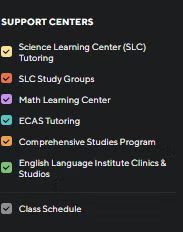
- The first thing you would access is a schedule that contains all the classes you are enrolled in. On the left side of the page, you can select/unselect UM support centers. Make sure that the Math Learning Center is checked so you can see the services are are offering.
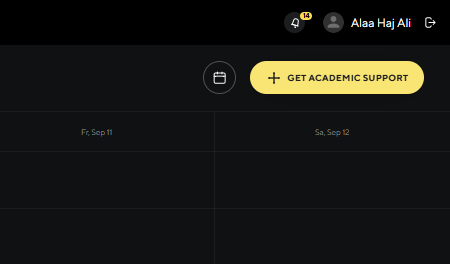
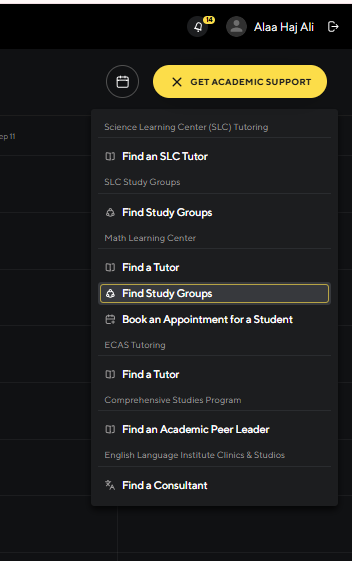
- Toward the top right corner, click on “Get Academic Support”, then on “find a study group” under the “Math Learning Center” title.
- You will see a list of the study groups you have already signed up for, the group requests you have submitted (if any), and a list of all available groups.
- Under ALL GROUPS, use the courses filter! Click on courses, then choose the math course you are currently taking (Math-115, Math-116, Math-215,…).
- You can also use the weekdays filter if you are looking for a study group on a particular day.
- Once you find a group that you are interested in joining, click on “View Group” to see the group information, then click on “Join Group”.
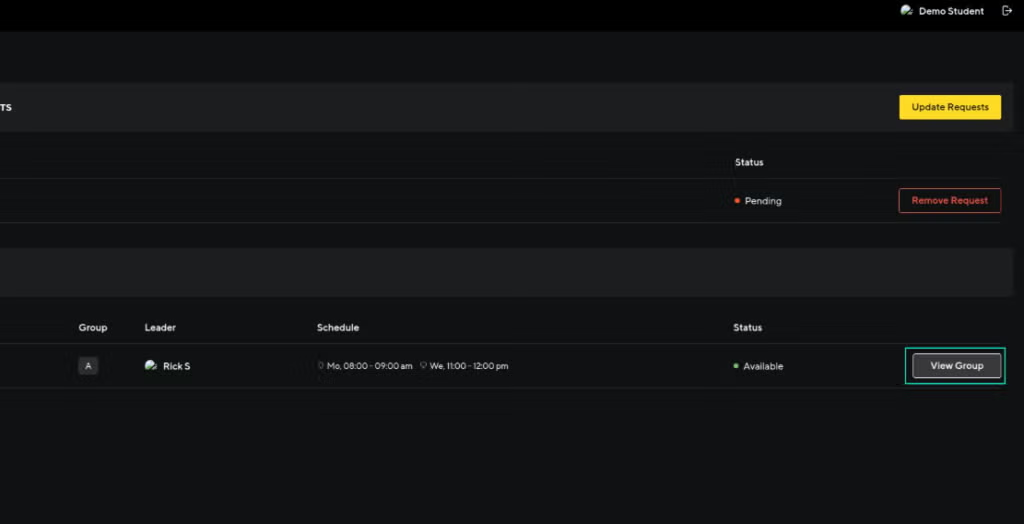
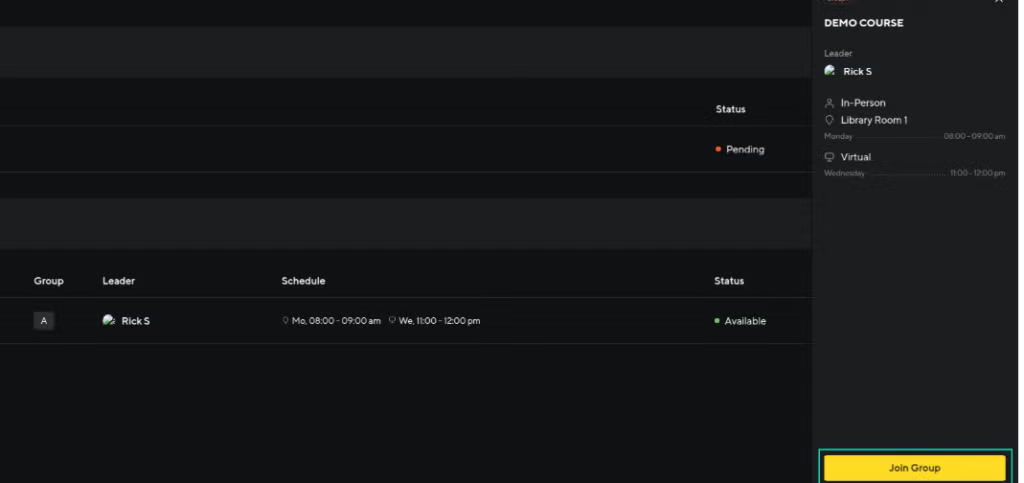
- Now the group will appear on your “My Groups” list! It will also appear on the Calendar you see when you sign in to the app!!
- You can now click on “View Group” to see the group information again, and to access the “Group Chat” which can be a convenient tool to communicate with your group!
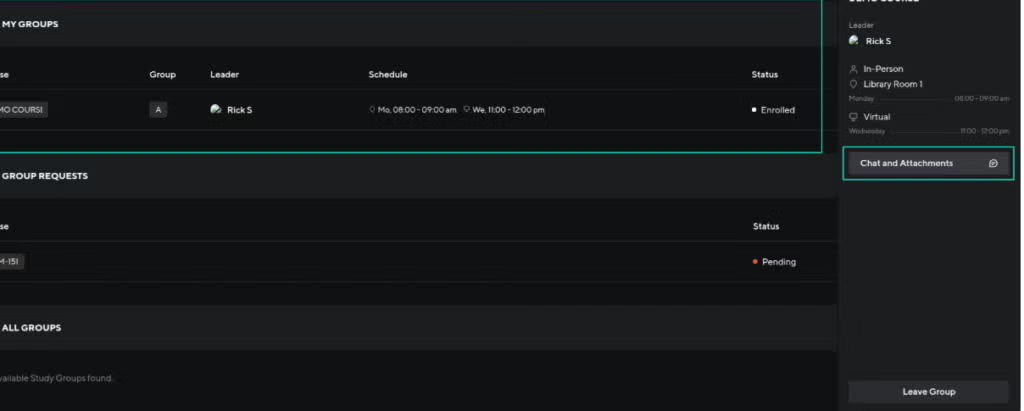
- In case you need to leave a group you have already joined, there is a “Leave Group” bottom at the bottom right corner.
2:30-4:00 pm
Monday
Study Groups
| Math 115: Jaxson Cicotte Jobin Mehrotra |
| MATH 116: Max Wang |
Tuesday
Study Groups
| Math 115: Anna Wentling Jobin Mehrotra |
| Math 116: Binh Ho |
Wednesday
Study Groups
| Math 115: Srihitha Nimmagadda Noah Perez |
Thursday
Study Groups
| Math 115: Jacob Vogel Srihitha Nimmagadda |
| Math 116: William Hutton |
Friday
Study Groups
Sunday
closed
7:00-9pm
Monday
Study Groups
| Math 105: |
| Math 115: Srihitha Nimmagadda Louie Prince Noah Perez |
| Math 116: Charlotte Holtan Angela Zhou |
| Math 215: Alexander Ponomarev Rory Morter Yagho Mota |
Tuesday
Study Groups
| Math 105: Breanna Rawlins |
| Math 115: Anna Wentling Jaxson Cicotte Alan Velazquez Yiding Chen |
| Math 116: Kenny Deng |
| Math 215: Turner Peterson Greghty Jameson |
Wednesday
Study Groups
| Math 105: Jingkai Lan |
| Math 115: Sida Tong Noah Perez |
| Math 116: William Hutton Bernardo Abner |
| Math 215: Greghty Jameson Yagho Mota |
Thursday
Study Groups
| Math 105: Jingkai Lan |
| Math 115: Nathan Lee Tyler Hannert Yiding Chen |
| Math 116: Binh Ho |
| Math 215: Alex Danielski Vasiliki Tsirukis |
Friday
CLOSED
Sunday
Study Groups
| Math 115: Joseph Heerema Jaxson Cicotte Alan Velazquez Jobin Mehrotra |
| Math 116: Changsun Yu Owen Stimer |
| Math 215: Mihir Epel William Song Yagho Mota |